

Cybercrime hit the headlines at the end of 2025, as national high street chains were targeted in a wave of attacks that continue to impact retailers and customers.
The scale and effects of these attacks can be wide-ranging, with supply chain issues limiting the number of deliveries that can be made to stores, and affecting how stock is managed, located and dispatched. This was a particular issue in the recent cases, where one of the targeted stores had to shut down its online ordering facility for several weeks.
Whilst an array of tools can be deployed to defend against cyber attacks, it’s important to remember the role that everyone within an organisation plays in protecting against these threats. The human user is always the last line of defence.
We’ve previously looked at the threat of phishing attacks, and how criminals look to access victims’ computers, networks, and information. In this article, we’ll look into how you can prevent cybercriminals gaining access to your business or client information, and what the impact on you could be if they do.
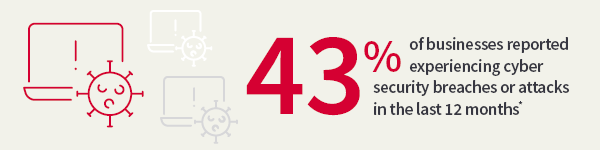
*Source: https://www.gov.uk/government/statistics/cyber-security-breaches-survey-2025/cyber-security-breaches-survey-2025
Cyber threats continue to evolve, and their consequences often prove more costly than a localised IT issue or fraud. A recent Cyber Security Breaches Survey by the UK Government’s Department for Science, Innovation and Technology found that the average cost of the most disruptive breach was £3,550 for businesses and £8,690 for charities. Further indirect impacts can be felt long after an attack, including reputational damage, loss of customers or even regulatory fines.
Although their methods keep evolving, attackers will always aim to compromise the confidentiality, integrity and availability of your data and systems.
A vulnerability is a weakness in an IT system that can be exploited by a malicious actor looking to gain access to your business’s systems. They can do this by exploiting flaws in your technology, or by capitalising on user error.
Vulnerabilities often arise as a flaw in a piece of software – an unintended consequence of a particular function within the programme. Where these issues are identified by the manufacturer, they can be rectified by ‘patching’, which involves the release of an update that will close the vulnerability. However, it can take time for both the vulnerability to be identified, and a fix to be released.
User error can also be a source of vulnerabilities. Mistakes or actions taken by a user might give a window of opportunity to attackers. Examples could include:
Fraudsters and cyber criminals actively seek out and exploit vulnerabilities as a central part of their approach. There’s even a black market for information on ‘Zero Day Vulnerabilities’ – recently discovered flaws that haven’t yet reached the public domain, and for which there is not currently a fix. Information about Zero Day Vulnerabilities can change hands for large sums of money before being used in an attack.
When manufacturers, such as Microsoft, become aware of vulnerabilities, they push out ‘patches’ in order to update the software and remove the issue. It’s important to make sure your operating systems are set up to automatically receive and download patches and other updates as soon as they become available.
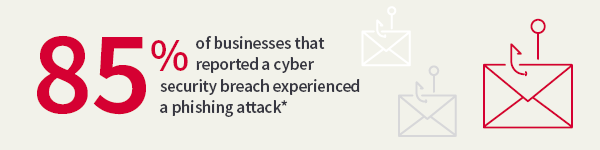
*Source: https://www.gov.uk/government/statistics/cyber-security-breaches-survey-2025/cyber-security-breaches-survey-2025
Ransomware is a type of malicious software (malware) that locks users out of a system, device or database. It is often directed at a single machine, but then spreads across the company. The attacker will then demand a ransom in return for restoring access. They usually state that the payment must be made in a cryptocurrency, as this allows them to remain largely anonymous and untraceable.
Law enforcement agencies and bodies, such as the National Cyber Security Centre, do not encourage, endorse or condone payment of ransom demands. This is because there’s no guarantee the attacker will uphold their side of the bargain, or that your information will not have been either tampered with or copied by the attacker.
What’s more, giving in to the attacker may make you more likely to be targeted again in future, and your system could still remain infected anyway, because granting you access does not necessarily involve removing the malware.
It's also worth bearing in mind that any payment you make to an attacker is ultimately funding criminal groups and activities.
Examples have now been seen whereby a second ransom demand is made – often for a higher amount – against the threat of disclosing the encrypted data, and thereby exposing the organisation to substantial regulatory action.
Again, there’s no guarantee that paying a ransom will stop the data being tampered with or released.
The most common way ransomware can take hold is via email, when a user clicks on a malicious link or opens an attachment. Phishing attacks are a prime example of how ransomware can arrive on a computer or network.
Websites or social media pages can also host malicious links, and removable media, such as USB or memory sticks, may be used to infect your machine too.
There’s no way to completely protect against malware infection, but you can take steps to prepare for a possible attack, and lessen the impact if one does occur.
It’s important that your colleagues, staff, partners and clients all have an awareness of the threat. Understanding how malware could enter a system or device (such as via email, websites and removable media like a USB drive) allows them to consider the risks and take preventative steps.
It’s also worth introducing a regular back up process, taking frequent copies of your most valuable data to be secured separately and securely, perhaps off site.
If your systems are compromised and your devices or data have been locked, you should seek professional advice, and report the attack to the police.
This area of the website is intended for financial advisers and other financial professionals only. If you are a customer of AJ Bell Investcentre, please click ‘Go to the customer area’ below.
We will remember your preference, so you should only be asked to select the appropriate website once per device.